
Digital Marketing Setup for a New Business: What to Do First

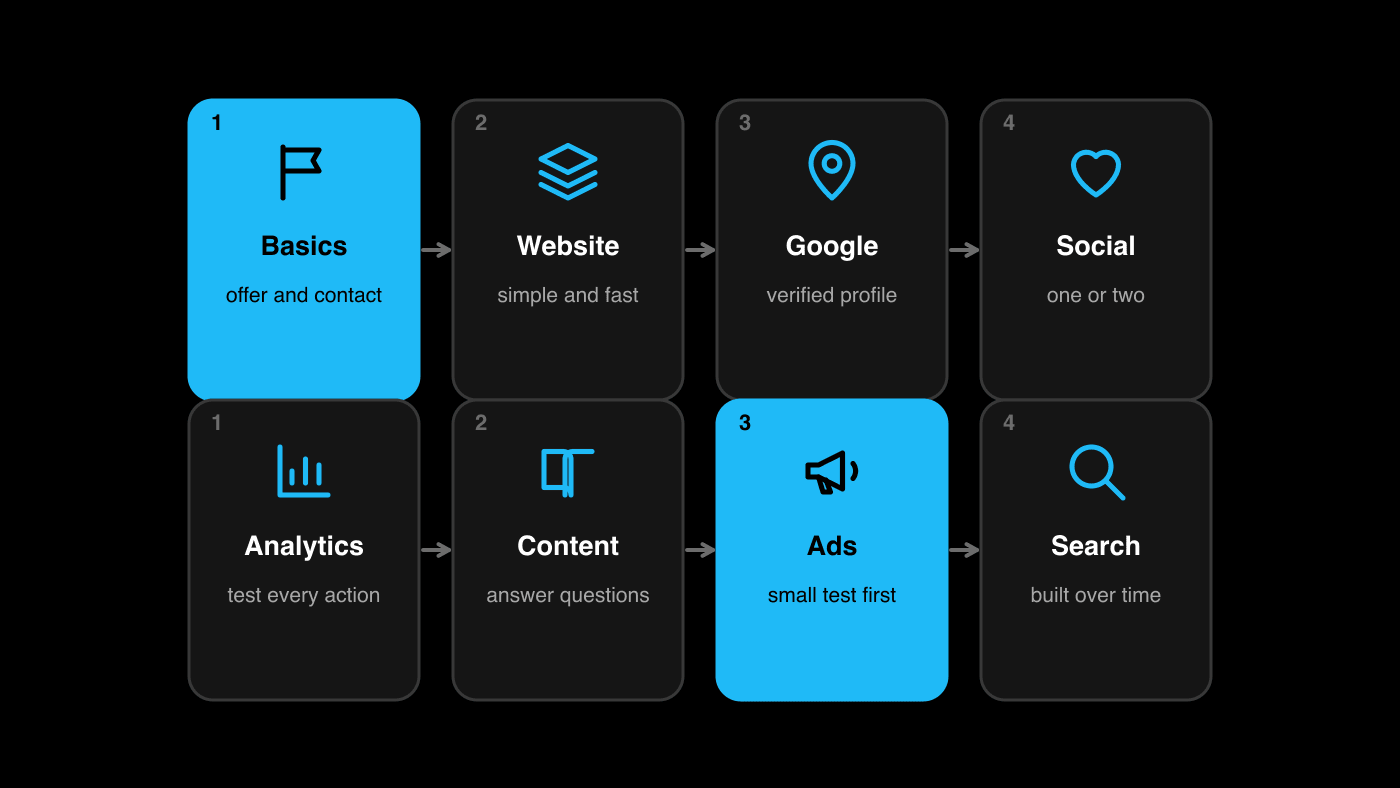
Short answer: A new business should set up its digital marketing in this order: clear basics (what you sell, to whom, contact details), a simple website, an accurate Google Business Profile, one or two social profiles, analytics, useful content, then ads and search optimisation once tracking works. Most checklists list dozens of tasks; the order and the "can wait" list matter more than the length.
A new business faces two opposite risks: doing nothing because there is too much to do, or doing everything at once and finishing none of it. A sequence solves both. Each step below prepares the next, and each has a reason.
This guide covers digital presence only. Legal registration, licences, tax and accounting are separate matters that need qualified advice and are not part of it.
Step 1: What are the foundations?
Before any tool, decide and write down:
- What you sell and to whom: one clear sentence about the customer and the problem you solve.
- Your name and how it is written: the exact business name, spelled and formatted the same everywhere.
- Contact details: a phone number, WhatsApp number and email you will actually monitor.
- Your location and hours, or your service area.
- One offer a new customer can say yes to, and how they order or book.
- A simple visual identity: a logo, two colours, and photographs you have the right to use.
If these are unclear, everything you build will be unclear too. Consistency matters: search engines and customers compare what they find.
Step 2: What should the first website contain?
A first website does not need many pages. It needs to answer a stranger's questions and offer an action. A sensible minimum:
- A home page that says what you do, for whom and where, with one main action
- A page for each main product or service
- An about page with who you are, real photographs and how to reach you
- Contact details, a map link if visitors come to you, and a WhatsApp or call button
- A privacy policy and terms that describe your real practices, prepared by a qualified person
Make it fast and easy on a phone. Use real photographs. Buy your own domain and keep control of it. Our notes on website development and branding show how these pieces are planned.
Step 3: How do you get a Google presence?
If customers come to a location or a service area, create a Google Business Profile and verify it. Google's help page on local ranking stresses verification and accurate details, and says you cannot pay to rank higher locally. So complete every section accurately, choose the right categories, add real photos, and ask happy customers for honest reviews. Keep your name, address and phone number the same as on your website.
If you later cannot find your business, why a local business is not showing on Google shows what to check.
Step 4: Which social profiles do you need?
You do not need every platform. Choose the one or two where your customers already spend time, and do them properly:
- Use the same name, logo and description as everywhere else.
- Add contact details and a link to your website or chat.
- Post what helps customers decide: what you do, how it works, real examples, answers to common questions.
- Set a schedule you can keep.
An account you update regularly is worth more than five you abandon. Reserve the name on other platforms if you like, but do not feel obliged to use them.
Step 5: What should you measure, and how?
Set up tracking before you spend on promotion, so that early results teach you something. At minimum:
- Website analytics that show visitors, sources and pages.
- Conversion events for the actions that matter: calls, messages, form submissions, bookings or orders. Google explains conversion tracking in its overview.
- A simple enquiry log with date, source, need and outcome. A spreadsheet works.
- Search Console for your website, to see whether your pages are indexed.
Test every action yourself: submit the form, tap the button, place a test enquiry, and confirm that you receive it and that the event is recorded.
Step 6: What content should you create first?
Start with content that answers the questions customers ask before they buy:
- What exactly do you offer, and what is included?
- How does it work, and how long does it take?
- What does it cost, or how is it priced?
- What should I expect, and how do I get started?
- Who else has used it, if you have permission to share?
Put those answers on your website and turn them into short posts or videos. Original photographs and honest descriptions do more than volume. Do not copy other businesses' content.
Step 7: When should you start ads?
Start ads when three things are in place: a page that converts, tracking that works and someone to answer enquiries quickly. Then begin with one small campaign with one clear offer: search ads where people already look for what you offer, or social ads where you need to be discovered. Set a test budget you can afford to lose and a definition of success before you begin; our guide on how much a small business should spend on marketing shows how to work that out.
Review the results weekly at first, and change one thing at a time.
Step 8: What about search optimisation?
Search optimisation is the work of helping people find your pages through search engines. For a new business, the useful basics are:
- Pages that clearly describe each service, with titles and headings that say what they are
- Accurate business details across your site and profiles
- Fast, mobile-friendly pages
- Content that answers real questions
- Reviews and genuine mentions over time
Results take time, and nobody can promise a ranking. Keep building steadily, and check in Search Console how your pages perform.
Step 9: What can safely wait?
New owners often lose weeks on things that do not yet matter:
- Perfect branding and a custom logo animation
- Presence on every social platform
- Long blog schedules
- Complex marketing automation
- Paid tools you do not have data for
- Advanced technical optimisation
Add them when there is something to measure and a customer waiting.
What does a realistic first month look like?
| Week | Focus | Result |
|---|---|---|
| 1 | Foundations: offer, name, contact details, photos | A written one-page brief |
| 2 | Website, Google Business Profile | A live site and a verified profile |
| 3 | Social profiles, analytics, enquiry log | Tracking that works; first posts |
| 4 | Content and a small first campaign, if ready | First enquiries and first lessons |
Adjust the pace to your situation. The point is the order.
A home-bakery scenario (illustrative, not a client result)
Imagine a new home-bakery. The owner writes the offer (custom cakes within the city), buys a domain, builds a five-page site with photographs of her own work and a WhatsApp order button, creates and verifies a Business Profile, opens an Instagram account, sets up analytics and an order log, and posts three photographs and one short video a week. After a month she runs a small local campaign for a festive box.
She has not done everything. But every step prepared the next, and she can tell how customers found her.
Common mistakes
- Buying ads before there is a page or a way to answer messages.
- Inconsistent name, number or address across the site and profiles.
- Skipping tracking, then guessing what worked.
- Copying another business's photos or text.
- Trying every platform.
- Expecting immediate results from search optimisation.
A new-business setup checklist
- I can say in one sentence what I sell and to whom.
- Name, phone, WhatsApp, email, location and hours are decided and consistent.
- My website answers customers' questions and offers one action.
- My Google Business Profile is verified and accurate.
- One or two social profiles are set up and active.
- Analytics, conversion events and an enquiry log work and are tested.
- I have written content that answers customers' key questions.
- I will start ads only when tracking and follow-up are ready.
Questions new business owners ask about digital marketing
What should a new business do first for digital marketing?
Clarify what you sell, to whom and how customers contact you. Then build a simple website, set up your Google Business Profile, choose one or two social profiles and set up tracking. Ads and search optimisation come after those.
Do new businesses need a website if they have social media?
A website gives you a stable place you control, with your services, contact details, policies and proof. Social profiles help people find and follow you. Most businesses benefit from both.
How soon should a new business start advertising?
When you have a page that converts, working tracking and a way to answer enquiries quickly. Starting earlier usually wastes spend.
How long does search optimisation take?
It varies with competition and your starting point, and it builds gradually. Nobody can promise a ranking. Keep improving pages and profiles and monitor results in Search Console.
Can Advertizer help set up a new business's digital presence?
Yes. Advertizer offers business setup, meaning full business digital presence setup. It does not cover registration, legal, accounting or government services.
The short version
For a new business, order beats volume. Define the basics, build a simple website and a Google presence, choose one or two social profiles, set up tracking, create helpful content and only then advertise. Leave the rest until you have something to measure.
If you want help setting up your business's digital presence in the right order, talk to Advertizer. Our Full Digital Business Setup is a one-time service that builds that foundation for you.